Resources your website needsThat phrase sounds simple; however, if you don't translate it into metrics (concurrency, CPU, RAM, disk, email, and dependencies), you end up overpaying or, worse, falling short just when a campaign starts to perform. Therefore, instead of guessing at "a medium-sized plan," we're going to size it logically: first the actual traffic, then the email, and finally the applications that amplify the load.
Furthermore, if you're considering migrating to a more controlled environment, you should combine this approach with a migration and operating cost analysis, since the expense isn't just "monthly rent," but also continuity and support; therefore, you can rely on the guide of Cobalt Blue Web about migration costs to manage expectations from the start.
Resources your website needs: difference between visits, sessions and concurrency

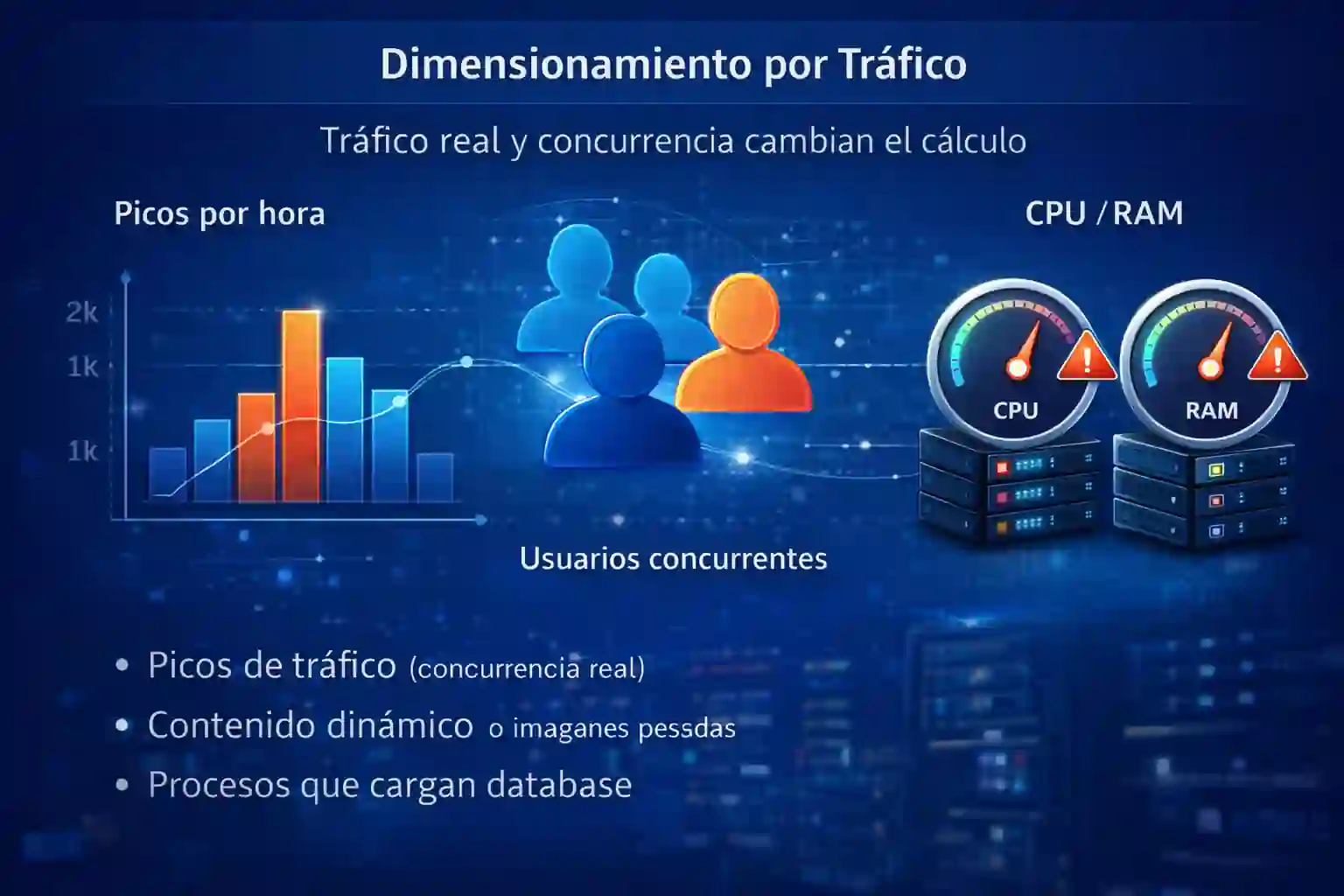
Actual traffic and concurrency change the calculation
Although many companies look at "monthly visits," the critical variable is usually concurrency: how many people are loading pages at the same time. In fact, 50,000 monthly visits can be manageable if they are spread out; however, 5,000 visits in one hour due to a single ad campaign can crash a small server.
Therefore, before talking about CPU or RAM, estimate:
-
Peak times per hour (campaigns, seasons, launches).
-
Type of content (simple landing page vs catalog with filters).
-
Dynamic (static pages vs database queries).
-
Resource weight (images, scripts, embedded video).
Similarly, if your site uses WordPress, WooCommerce, or a CMS with many plugins, concurrent traffic is more critical because each visit triggers PHP execution, queries, and internal calls. Consequently, the "same amount of traffic" requires very different resources depending on how the site is built.
Resources your website needs for low traffic and corporate blogs
If your site is primarily informational (blog, company page, portfolio), resource consumption is usually concentrated on serving content and loading static resources. Even so, if the theme is resource-intensive or the visual builder generates many scripts, RAM can become the first limiting factor.
In this scenario, the recommended approach is to prioritize:
-
Fast storage (SSD/NVMe) so that the response time does not depend on the disk.
-
Caching (at the application and server level) to reduce repetitive work.
-
CDN if your visits are geographically distributed.
Furthermore, if your team doesn't want to handle patching, security, and monitoring, it's worth considering a managed model with support, because the real savings come from reducing incidents, not from "saving $200 pesos a month." In parallel, you can compare infrastructure and operational criteria with this external guide focused on business environments To validate that your choice includes continuity, not just computing. (Integrated CTA 1: Use it as a checklist to review actual scope.)
Resources your website needs for medium traffic and lightweight ecommerce
Once you have a catalog, internal search engine, filters, shopping cart, and checkout, the workload doesn't increase linearly. In other words, it's not "double the visits = double the resources," because each user performs more processes, more queries, and, in some cases, more calls to third parties (gateways, inventory, tracking).
Therefore, here's what you need to watch out for:
-
CPU: because the server processes logic (PHP/Node/.NET, etc.).
-
RAMBecause in-memory caching reduces latency and CPU usage.
-
DatabaseBecause a bad index can trigger time changes without you noticing.
Furthermore, email becomes part of the conversation if you send notifications, confirmations, and tickets, as message volume and reputation (SPF/DKIM/DMARC, antispam) impact operations. Consequently, even if the site "appears to be web-only," sizing should include email if it's part of the business flow.
Resources your website needs for high traffic and paid campaigns
Under high traffic, the bottleneck changes rapidly: sometimes it's the CPU; other times, it's the database; and frequently, it's the disk due to logs, sessions, or backup processes. Therefore, this is where monitoring becomes critical to identify the limiting factor, rather than blindly increasing the plan.
At this level, actions such as the following often become necessary:
-
Separate the web and the database (or at least optimize the database with discipline).
-
Implement aggressive caching and clear expiration rules.
-
Ensure scalability (vertical or horizontal) for peaks.
Similarly, if your business relies on operating windows and cannot tolerate downtime during business hours, then support and incident response cease to be an "extra" and become part of the design. In that sense, if you require continuous technical assistance, it's worth reviewing the supported operations approach to understand what a truly supported model entails, beyond just providing support. server.
Resources your website needs for email: mailboxes, retention, and antispam

Email: capacity, security, and synchronization
Although “email” may not seem like part of “hosting”, in practice it does compete for resources, especially if:
-
You have many mailboxes,
-
long retention guards,
-
You receive large attachments,
-
and you also filter spam with additional layers.
For this reason, size mail on three axes:
-
Capacity per mailbox (and monthly growth).
-
Concurrence (how many users sync at the same time).
-
Security politics (antispam, quarantine, logs, audit).
Furthermore, if you have campaigns, forms, and transactional notifications, then your reputation and deliverability impact sales and support. Consequently, the critical "resource" may be less CPU and more correct policies, limits, and administration.
Resources your website needs if you use applications: CRM, ERP, integrations and APIs

Integrations elevate processes
This is where the game changes: when the site connects with ERP, CRM, inventory, billing, or an administrative system, the problem is no longer just "loading pages," but running processes. Therefore, the question becomes: how many integrations generate calls per minute, and how many depend on quick responses?
Additionally, if your business runs Windows applications, remote desktops, or centralized administrative systems, it's worth reviewing specific Windows VPS options geared towards enterprise workloads, because the usage pattern differs from that of a traditional website; therefore, you can consult the server solution for systems administrative and compare it with your needs.
Also, consider these variables, because they tend to increase resources and support:
-
scheduled tasks (stamps, synchronizations, imports).
-
Nighttime processes (closures, backups, reports).
-
External dependencies (Banking APIs, gateways, SAT, providers).
Consequently, even if web traffic is "not high", a poorly controlled integration can saturate CPU or block database, generating slowness that is perceived as a "hosting problem".
Resources your website needs in storage: images, backups, and databases
Storage capacity is often underestimated because "there are gigabytes," but performance depends on the type of storage and how many operations per second it supports. In fact, two servers with the same "size in GB" can perform differently if one uses NVMe and the other uses a slower drive.
Therefore, when sizing storage, consider:
-
Image size (and if you're already using WebP, ensure correct compression and sizes).
-
Database growth (orders, logs, sessions).
-
backups (frequency, retention, and restoration tests).
Furthermore, it defines where backups reside: if they share the same disk, you lack true independence; conversely, if they are separated, you improve recovery and reduce risk. Consequently, the "cost" becomes a matter of business continuity, not a technical luxury.
Below is a practical (and indicative) framework for thinking about scenarios. It does not replace a diagnosis; however, it helps avoid decisions based on intuition:
| Scenario | Traffic and usage | Typical recommendation | Risk if you fall short |
|---|---|---|---|
| Corporate site | Low, rare peaks | Moderate CPU, sufficient RAM, SSD/NVMe, caching | Slowness due to RAM or disk |
| Light ecommerce | Average, peaks by campaigns | Better CPU, more RAM, optimized database, caching | Checkout crashes, 500 errors |
| Intensive campaigns | High, strong peaks | Scalability, monitoring, aggressive caching | Saturation and loss of sales |
| Web + integrations | Variable, business processes | Prioritize stability, databases, queues, and support | Blocks due to integrations |
Resources your website needs in support: monitoring, patches, and incident response

Risk control and operation
This point often defines the difference between "it works" and "it operates smoothly." For example, you might have sufficient resources, but if no one monitors spikes, logs, disk usage, and events, the problem will surface too late. Furthermore, without patching and hardening discipline, a security incident can lead to downtime, reputational damage, and unplanned costs.
Therefore, ensure that your plan includes:
-
Resource monitoring (CPU/RAM/disk) and actionable alerts.
-
Planned patches (and controlled change windows).
-
Incident management with clear timeframes.
-
Proven backup, not just “configured”.
Likewise, if your team needs support to scale and operate with an enterprise focus, it's advisable to centralize the conversation with a provider who can review scope, priorities, and implementation roadmap. In that case, you can establish direct contact with Cobalt Blue Web to evaluate your case based on metrics and not assumptions.
FAQ's
1) Which metric matters more: monthly visits or concurrent users?
Simultaneous users, because they determine the actual peak load and the probability of saturation.
2) When does RAM become the bottleneck in a website?
When the CMS, plugins, and cache consume memory, the server starts to "swap" or kill processes.
3) What usually gets overloaded first in ecommerce: CPU or database?
Frequently, the database, especially if there are filters, searches, and queries that are not optimized.
4) Does business email consume web server resources?
You can consume them if you are in the same environment; in addition, volume and security add operation and control.
5) What changes if the site is integrated with ERP or CRM?
Processes, calls, and dependencies are increasing; therefore, performance depends more on stability and monitoring.
6) Why does the type of disk affect performance so much?
Because read/write speed impacts databases, sessions, logs, and backups, even with moderate traffic.
7) When is it advisable to switch from hosting to VPS?
When you need resource control, peak stability, specific configurations, or closer support.
8) What is the minimum that a serious backup scheme should have?
Defined frequency, retention, separate copies, and periodic restoration testing.
9) How do I know if my slowness is due to resources or a bad configuration?
With monitoring: if CPU/RAM/disk are not at their limit, the problem is usually configuration, code or database.
10) What should I ask for in a quote to avoid surprises?
Scope, metrics, backup scheme, monitoring, security, SLA and what monthly support includes.