Si tu Hosting provider not responding And if your business is at a standstill, the worst-case scenario isn't the outage itself, but the improvisation: trying to "fix" it without evidence, without a recovery plan, and without data protection. Therefore, this article provides you with a practical, business continuity-focused protocol to restore service and reduce the risk of data loss.
Furthermore, it's important to understand one point: when support doesn't respond, the problem ceases to be technical and becomes a risk management issue. Consequently, you need to act with priority, but methodically.
1) Immediate containment: recovers the operation without worsening the damage

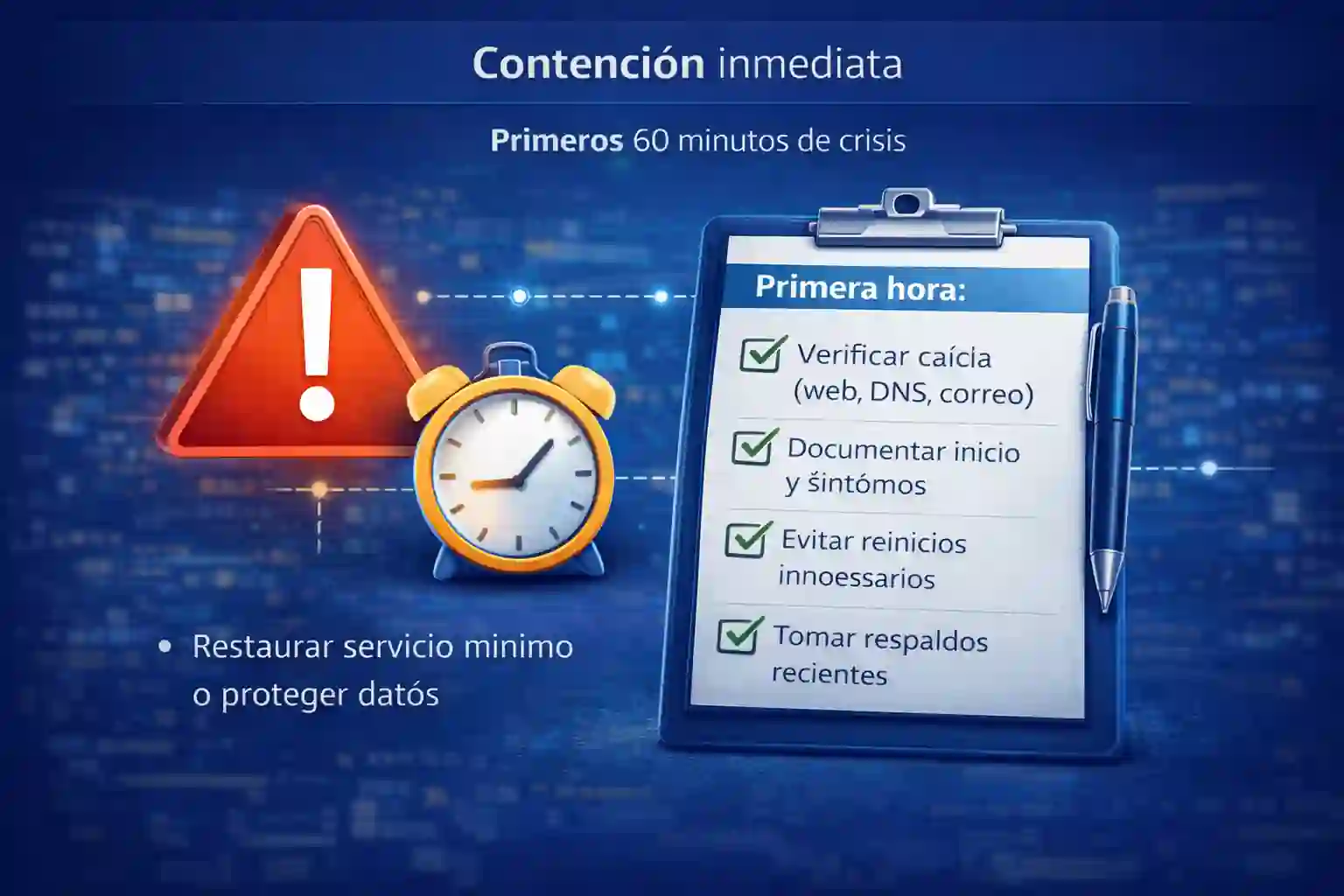
First 60 minutes of crisis
First, define your goal for the next 30–60 minutes: restore minimum service o protect dataIf your website sells, collects payments, or generates leads, securing the public-facing layer is your priority. However, if your operation relies on an administrative system (inventory, invoicing, point of sale), then protecting database integrity is equally urgent.
Recommended immediate actions:
-
Check if the outage is total or partial: website, email, database, control panel, DNS.
-
Document start time, symptoms, and recent changes (update, plugin, certificate, migration, payment).
-
Avoid repeated restarts "just to test", because they can corrupt services or worsen full disks.
-
If you have access, take quick logical backups: database export, copy of critical configurations and logs.
Additionally, if your business relies on remote sessions or desktop applications, then consider whether you can activate an alternate environment. In that scenario, it's important to understand what running systems on a VPS with enterprise support entails, because recovery changes completely when there's continuous management and monitoring; for reference, review the approach of Windows VPS servers for administrative systems and use it as a minimum standard to avoid losing control in the next emergency.
2) Layered rapid diagnostics: DNS, server, application, and email

Identify where the chain breaks.
Next, identify where the chain broke. This allows you to contact support with evidence and, most importantly, decide whether it's better to wait or migrate.
Layer A: DNS and domain
If the domain fails to resolve, the site "appears to be down," even though the server is still running. Therefore:
-
Review propagation and A/CNAME records.
-
Verify that the domain is valid and not locked due to payment.
-
Confirm if there were any recent nameserver changes.
Layer B: Server and network
If the server is not responding, you may be facing:
-
Provider node failure.
-
Suspension for non-payment or “abuse” (false security positives).
-
Resource saturation (CPU/RAM/disk).
-
Attack or sudden increase in traffic.
C: Application (CMS/ERP/BD)
If the server responds but the website doesn't, it could be:
-
Conflicting plugin, update, or 500 error.
-
Database saturated or corrupt.
-
Disk full due to logs or backups.
D: Mail
If the email stopped sending, it could be because:
-
Reputation block.
-
Expired certificates.
-
Storage saturation.
-
DNS change not replicated.
Furthermore, if you want to prevent saturation from bringing you down again, it's crucial to size resources based on traffic, emails, and applications, since many businesses collapse because they operate at their limits without realizing it. Therefore, use Cobalt Blue Web's article on real infrastructure capacity as a guide: Resources based on traffic, emails, and applications.
3) Evidence and escalation: provider's response strength with concrete data
If your provider doesn't respond, you need two things: technical evidence y record of contact attempts. Therefore:
-
Open a formal ticket (if one exists), in addition to email and an alternate channel.
-
Attach evidence: screenshots, error codes, traceroute, timestamps, logs.
-
Explicitly request: “node status”, “ETA”, “preliminary root cause”, “actions taken”.
Additionally, if there's an SLA, mention it in the ticket and request escalation. If there's no SLA, that's also information: the provider is operating without a contractual agreement, and your company is absorbing the risk.
In parallel, if you want to avoid repeating this situation, it's a good idea to have a checklist handy for evaluating providers (especially support, SLAs, verifiable backups, and testing plans). Therefore, save the following for reference: Checklist for hiring a VPS And use it when the crisis is over, to change providers methodically, not impulsively.
4) 24-hour continuity plan: decide whether to wait or migrate

After recovery: avoid repetition
Here you must make an executive decision: wait for support o activate urgent migrationTo decide, use three criteria:
-
Economic impact per hour (sales halted, operation halted, penalties).
-
Data risk (Are there any transactions in progress? Could information be lost?)
-
Actual probability of recovery (Is the provider responding? Do you have access? Is there an ETA?)
If the hourly loss is high and the provider still does not respond, then migrating ceases to be a "technical option" and becomes a continuity action.
Furthermore, in many cases, a provider with continuous technical support drastically shortens containment and recovery times. Therefore, it's worth reviewing what a truly supported operating model entails, especially for enterprise environments: see the external guide on cloud system with technical support.
5) Urgent migration without losing data: prioritization order

Extract critical data and cut off by DNS
If you decide to migrate, the correct order is the one that minimizes loss:
Step 1: Freeze changes and protect integrity
If there's a database, avoid writing more data while you're in transition. If the system is unstable, try putting it into maintenance mode to stop transactions.
Step 2: Extract the critical elements first
Prioritize:
-
Database (export or dump).
-
Configuration (files .env, config.php, connection parameters).
-
Certificates and keys if applicable.
-
Content (uploads, media, repositories).
3: Create a clean environment
Create a new environment, with correct versions, basic security, and a consistent folder structure.
4: Rapid health tests
Before publishing:
-
Database connectivity.
-
Login and purchase flow (if it is ecommerce).
-
Transactional forms and emails.
-
Initial performance.
5: DNS Cutoff
Update DNS with a low TTL if possible, monitor propagation, and ensure that sessions between the old and new environments are not mixed.
Also, document everything. This helps you to make claims, conduct audits, and standardize the next migration.
6) After recovery: actions to prevent it from happening again
When the business resumes operations, avoid falling into the trap of thinking "it's fixed now." Instead, take the opportunity to close gaps:
-
Define SLAs and response times as a contractual requirement.
-
Implement proactive monitoring (alerts before it collapses).
-
Establish a backup policy with restore testing.
-
Size resources based on actual concurrency.
-
Separate roles: web, database, email, and backups (when applicable).
Additionally, if your operations rely on internal applications or remote sessions, then moving to an environment with enterprise-focused support and management can reduce recurring incidents. In that case, review again. Windows VPS servers for administrative systems as a reference for what a continuity-oriented service should include.
7) Warning signs: when you absolutely must change providers
Although all infrastructure fails at some point, there are signs that justify immediate change:
-
There is no response in critical incidents.
-
There is no evidence of backups or restores.
-
There are suspensions without prior notice.
-
There is no transparency regarding the node's state.
-
The platform crashes repeatedly during normal peak times.
Therefore, if you Hosting provider not responding During a crisis, don't treat it as "a bad day": treat it as a confirmed operational risk and adjust your strategy.
FAQ's
1) What do I do first if my hosting provider doesn't respond?
Contain the incident: confirm if it is DNS, server or application and document evidence.
2) How do I know whether to wait or migrate?
If the hourly cost is high and there is no reliable ETA, migrate.
3) What evidence do I need to gather to escalate support?
Timestamps, error codes, captures, traceroute, and contact log.
4) What is the most common mistake in a fall?
Restart without diagnosis and without backing up critical data.
5) What should I rescue first in an urgent migration?
Database, configurations, and content files.
6) How do I reduce the risk of data loss?
Freeze transactions and validate database integrity before the cutoff.
7) Why should the SLA be in writing?
Because it defines timelines and responsibilities; without an SLA, you absorb the risk.
8) What is a “verifiable” backup?
The one with documented proof of restore and execution reports.
9) What causes the hosting to crash without warning?
Resource saturation, full disk, traffic spikes, or node failures.
10) What should I implement after the recovery?
Monitoring, backup policy with restores, and sizing based on actual load.